Product Update: Secondary Account Manager

Upper Hand Product Update: SecondaryAccount Manager

✨ WHAT’S NEW

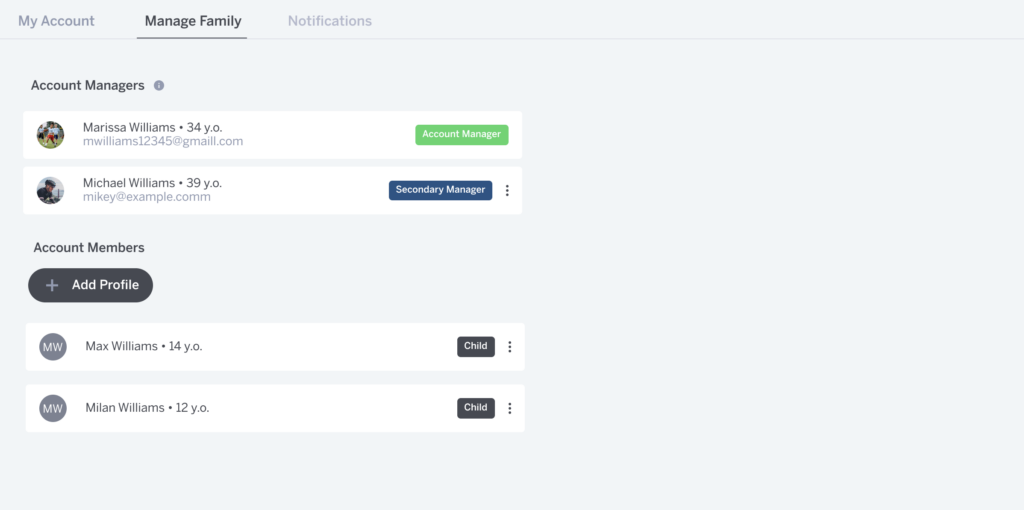
Secondary Account Manager

Families can now share scheduling access without sharing billing information.

That means another caregiver can book sessions and manage athlete profiles while billing details remain secure under the primary account holder.

This gives families more flexibility without compromising payment security.

Head to your account settings to assign a secondary manager.

Before and after

Before
One parent managed all scheduling under a single login. When another caregiver needed to book or reschedule, they either shared credentials or had to ask the primary account holder to make changes. This often led to delays, confusion, and extra support requests.

After
Families can assign a secure secondary manager. Caregivers can book and manage profiles independently, while billing access remains protected. Scheduling becomes shared. Payments stay controlled.

Secondary Account Manager

Why this matters for operators

Managing family accounts often creates unnecessary friction for staff.

This update helps reduce:

  • Account access support requests

  • Shared login confusion

  • Booking conflicts between caregivers

  • Manual profile updates by staff

Clearer access roles mean smoother scheduling and fewer account-related issues.

Why this matters for families

Families don’t operate as single users.

With secondary manager access:

  • Multiple caregivers can book sessions

  • Profiles can be managed collaboratively

  • Billing details stay secure

The experience reflects how households actually function.

What makes this approach work

It’s simple. Assign a secondary manager from account settings.

It’s secure. Billing information remains controlled by the primary account holder.

It’s practical. It solves a real coordination problem without changing how your programs run.

Now that shared access is available, families can manage scheduling the way they actually operate day to day.

Learn More

Share Article
Want more tips and resources delivered right to your inbox?
Related Content